Clearhead now supports payment and invoicing of all sessions for non-EAP (public) and Unimed co-pay clients. This means you can now invoice these sessions directly through Clearhead in the same way as EAP clients.
Please note this feature is only available for New Zealand therapists at present,
we will provide an update when this is released in Australia.
Why invoice non-EAP (public) payments through us?
- Generate invoices in a few clicks
- Clients are automatically provided receipts for all payments facilitated through checkout
- You are covered by our cancellation policy - you may choose to charge the full session fee if a booking is cancelled <24 hours before the scheduled date/time.
If you wish to invoice non-EAP (public) sessions through Clearhead, payment must be collected through Clearhead;
1. Go to the Bookings tab and click Book Another on a previous non-EAP (public) or Unimed co-pay funded session.
2. Select 'Clearhead collects payment'.
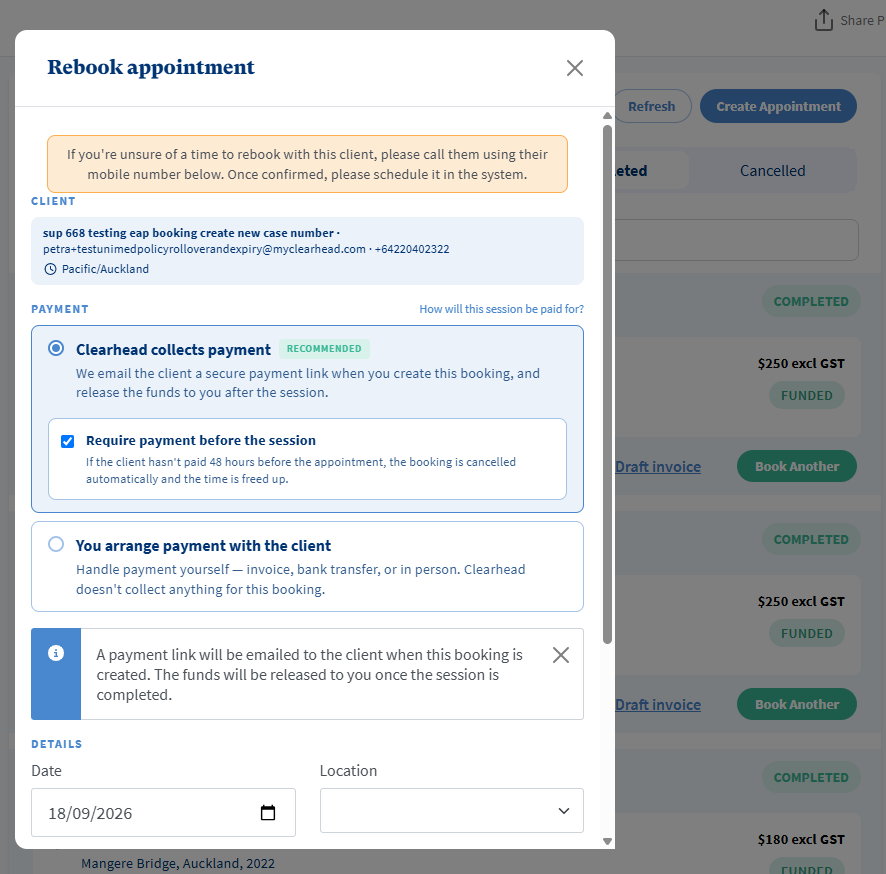
3. Choose if you want the client to pay before the session:
If you require us to collect payment before the session, ensure 'Require payment before the session' is selected. If the client does not pay 48 hours before the session, the booking will be cancelled.
If you don't require us to collect payment before the session, unselect 'Require payment before the session' and clients will be able to pay at any time. Please note we are only able to pay you when the client has paid Clearhead.
Clearhead will send payment reminders on your behalf in both cases, until payment is made.
4. A payment link will be sent to the client for them to pay for the session via checkout.
If the session requires payment prior it will be held in status Awaiting Payment and then Confirmed when paid.
However if payment has not been made 48 hours before the session, the session will be automtically cancelled.
If payment is not required before the session the session will be automatically Confirmed.
5. Once the session time and date has passed you are able to invoice for it through Clearhead.
Was this article helpful?
That’s Great!
Thank you for your feedback
Sorry! We couldn't be helpful
Thank you for your feedback
Feedback sent
We appreciate your effort and will try to fix the article